
Create new region in your Drupal 8 theme
In this video, we are going to learn how to create new region in our custom Drupal 8 theme.
We are going to learn what regions are, which regions do we have by default, what happens if we remove a region and how to properly declare a region with an example.
In Drupal regions are segments of the page on which we could assign blocks.
When we want to see all the regions on our page we could just go to Structure > Block layout and we could see all the regions with bold and under then we see all the blocks that are assigned for the specific region.
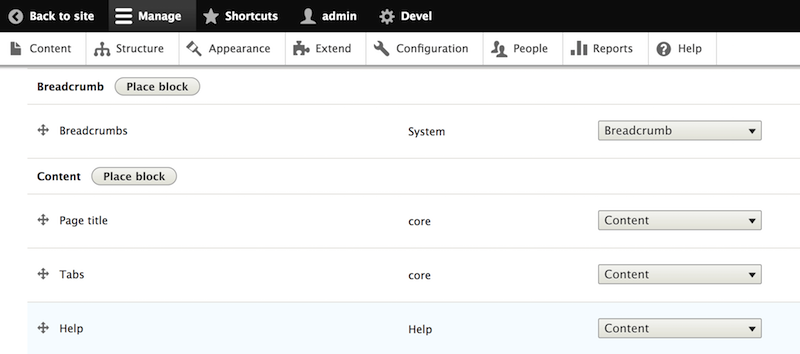
In order to create our own region, we would first have to find the default regions for our specific use case. If our theme is not using any base theme the default regions are defined in the documentation of the page.html.twig template:
Regions:

page.header: Items for the header region.
page.primary_menu: Items for the primary menu region.
page.secondary_menu: Items for the secondary menu region.
page.highlighted: Items for the highlighted content region.
page.help: Dynamic help text, mostly for admin pages.
page.content: The main content of the current page.
page.sidebar_first: Items for the first sidebar.
page.sidebar_second: Items for the second sidebar.
page.footer: Items for the footer region.
page.breadcrumb: Items for the breadcrumb region.
In our specific case, since we are using the bartik theme as a base theme the default regions could be found in the bartik.info.yml file in core/themes/bartik.
In order to create new region we would have to copy the regions that are coming from the bartik theme and add our region at the end like this:
# drupal_up.info.yml
name: Drupal Up
description: Our custom theme.
type: theme
core: 8.x
base theme: bartik

regions:
  header: Header New name
  primary_menu: 'Primary menu'
  secondary_menu: 'Secondary menu'
  page_top: 'Page top'
  page_bottom: 'Page bottom'
  highlighted: Highlighted
  featured_top: 'Featured top'
  breadcrumb: Breadcrumb
  content: Content
  sidebar_first: 'Sidebar first'
  sidebar_second: 'Sidebar second'
  featured_bottom_first: 'Featured bottom first'
  featured_bottom_second: 'Featured bottom second'
  featured_bottom_third: 'Featured bottom third'
  footer_first: 'Footer first'
  footer_second: 'Footer second'
  footer_third: 'Footer third'
  footer_fourth: 'Footer fourth'
  footer_fifth: 'Footer fifth'
  foooty_foot: 'Footy foot reagion'
We called our new region "foooty_foot" and the last thing we have to do is overwrite the page.html.twig template and render our region in it:
{# the part where we are rendering our region in page.html.twig #}
...
        {% if page.footer_fifth %}
          <div class="site-footer__bottom">
            {{ page.footer_fifth }}
          </div>
        {% endif %}
        <div class="footy">
          {{ page.foooty_foot }}
        </div>
      </div>
    </footer>
  ...
After adding it all we have to do is clear the cache and assign a region to our newly created region and it should work just like that.
The full code of the theme you may find here:
https://github.com/drupal-up/drupalup_new_region
A good article on drupal.org about how to create new regions:
https://www.drupal.org/docs/8/theming/adding-regions-to-a-theme
Meet the author

The idea is though not just to be another platform with some boring videos but all the videos to be inspired by real-world problems. That means something that you will most probably need if you work with Drupal.
We want you to be successful and we want to teach you everything we know about Drupal!
So watch the videos, try to follow and reproduce, ask questions and you will see you will be able to conquer this wonderful sea that Drupal 8 is.